Sections / Page templates
Password page
The page shown while your store is password protected. A full-screen photo with a heading, your password message, an optional launch countdown and a sign-up card for launch news. You are preparing to open and want to collect emails before launch.
Add the section
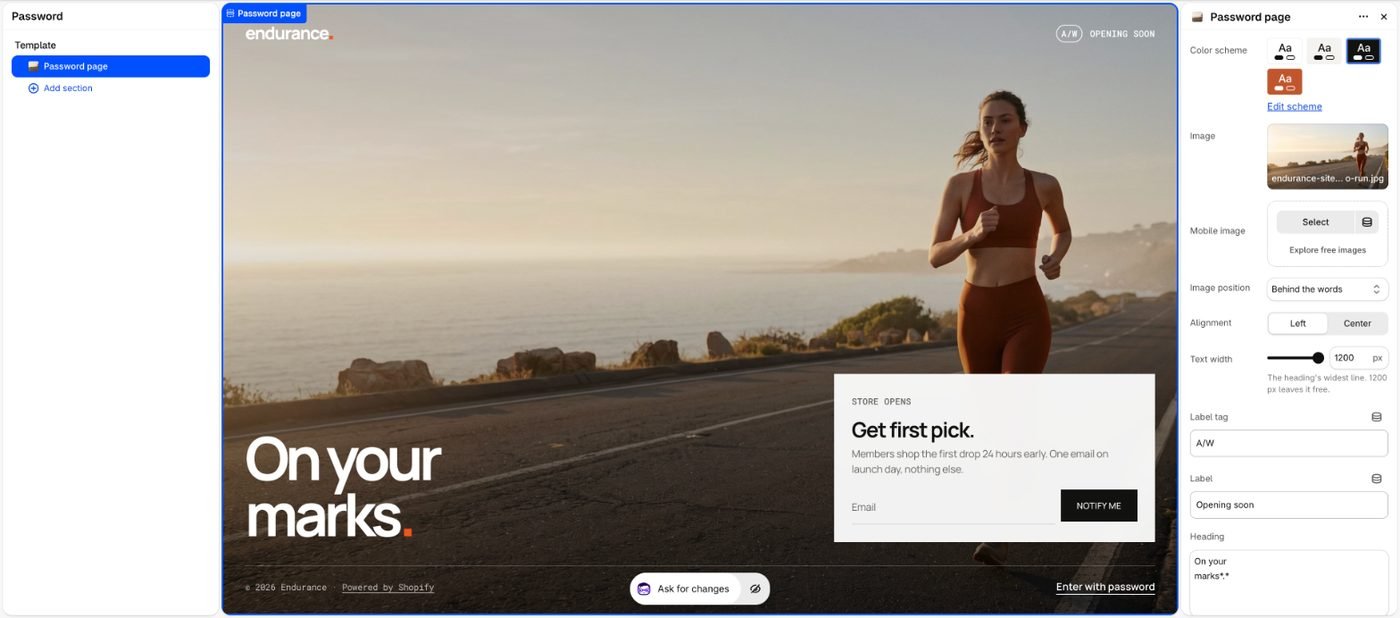
Password page selected in the theme editor: its blocks in the list on the left, its settings on the right.
This section is part of a page template (password), so it is already in place. Open that template in the theme editor and select the section to change it.
In the demo store: password.
Image sizes Desktop 2800 × 1575 px, 16:9. Mobile 1100 × 1950 px, 9:16. All image sizes

Section settings
| Setting | Type | Default | What it does |
|---|---|---|---|
| Color scheme | Color scheme | Scheme 3 | |
| Image | Image | — | |
| Mobile image | Image | — | |
| Image position | Choice | Behind the words | Options: Behind the words, Left, Right. |
| Alignment | Choice | Left | Options: Left, Center. |
| Text width | Slider 400–1200px | 1200px | The heading's widest line. 1200 px leaves it free. |
| Label tag | Text | A/W | |
| Label | Text | Opening soon | |
| Heading | Text | On your marks*.* | Wrap words in asterisks to highlight them. Their look comes from Theme settings → Text styles → Highlighted words. |
| Countdown | |||
| Opening date | Text | — | YYYY-MM-DD, e.g. 2026-11-04. The countdown hides when empty or once the date has passed. Uses your store’s time zone. |
| Start time | Text | 09:00 | 24-hour clock, e.g. 09:00. |
| Countdown style | Choice | Large numbers | Options: Large numbers, Boxes. |
| Message after the countdown | Text | — | Shown in place of the countdown once the date has passed, e.g. We're open. Empty hides the countdown. |
| Notify card | |||
| Label tag | Text | — | Leave empty to show the opening date. |
| Label | Text | Store opens | |
| Heading | Text | Get first pick. | |
| Text | Text | Sign up and we will email you when the… | |
| Show “Powered by Shopify” | Checkbox | On | |
Tip Enter the opening date as YYYY-MM-DD and a 24-hour start time to show a countdown. It uses your store's time zone.
Tip Sign-ups are saved as customers with the tags prospect and password page.
Tip Turn off Show "Powered by Shopify" to remove that link from the bottom row.
Tip Image position puts the photo beside the words (left or right) instead of behind them; Message after the countdown takes its place once the date has passed.
Limitations and troubleshooting
- The countdown hides when the date is empty or has passed.
- The message under the heading comes from the password page message in Shopify admin, not from the theme editor.
Related: 404 page
Was this page helpful? No, ask support
Still stuck?
Contact supportSend us a screenshot and your store link. We reply within two business days.