Sections / Page templates
Blog post
A blog post with its title, tag, author, date and reading time, a wide cover image, an "On this page" menu, share buttons, author bio and comments. A Shop this story block can show products inside the post. It is used for every blog post. Reorder or remove its blocks to suit long guides or short news.
 Storefront · desktop
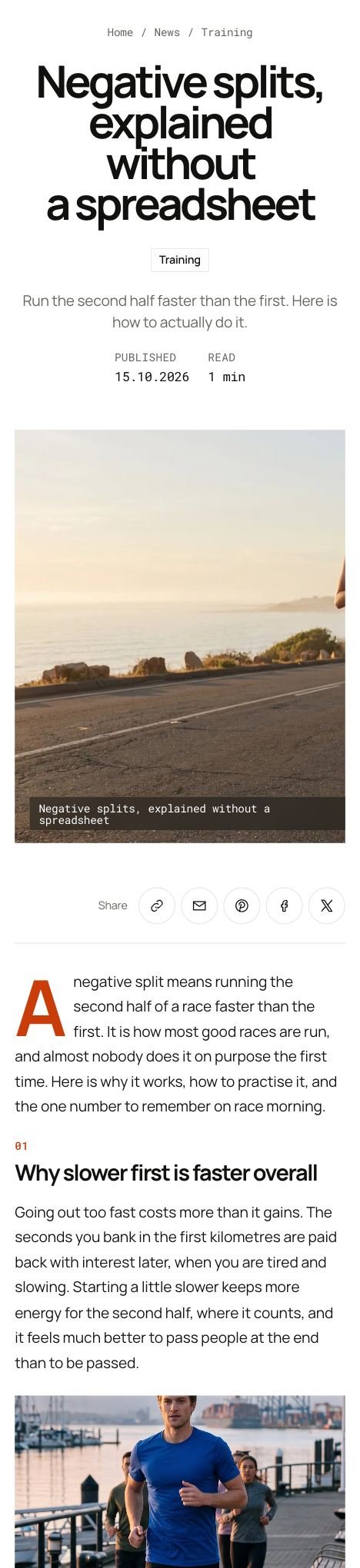 Storefront · phone
Add the section
This section is part of a page template (article), so it is already in place. Open that template in the theme editor and select the section to change it.
In the demo store: article.

Section settings
| Setting | Type | Default | What it does |
|---|---|---|---|
| Show reading progress bar | Checkbox | On | |
| Appearance | |||
| Color scheme | Color scheme | Scheme 1 | |
Blocks
Title (up to 1)
| Setting | Type | Default | What it does |
|---|---|---|---|
| Show breadcrumbs | Checkbox | On | |
| Show category | Checkbox | On | The post's first tag. |
| Show excerpt | Checkbox | On | |
| Show author | Checkbox | On | |
| Show date | Checkbox | On | |
| Show the reading time | Checkbox | On | |
| Show comment count | Checkbox | Off | Needs a Comments block and comments turned on for the blog. |
| Title size | Choice | Auto | Auto steps a long title down so it doesn't fill the screen. Options: Auto, Small, Medium, Large. |
| Alignment | Choice | Center | Options: Left, Center. |
Featured image (up to 1)
| Setting | Type | Default | What it does |
|---|---|---|---|
| Show a placeholder when a post has no image | Checkbox | Off | Useful while setting up the store. |
| Image shape | Choice | The theme's design (21:9) | Options: The theme's design (21:9), Adapt to image, Wide (16:9), Classic (3:2), Landscape (4:3), Square (1:1). |
| Image shape on phones | Choice | Portrait (4:5) | Options: Portrait (4:5), Same as on desktop, Adapt to image, Square (1:1), Landscape (4:3). |
| Full width | Checkbox | Off | |
| Corners | Choice | Follow theme settings | Options: Follow theme settings, Square. |
| Show the image's alt text as a caption | Checkbox | On | Set it in Content > Files. |
Content (up to 1)
| Setting | Type | Default | What it does |
|---|---|---|---|
| Show “On this page” menu | Checkbox | On | Built from the H2 headings in the page content. Shown when there are two or more. |
| Number the H2 headings | Checkbox | On | |
| Large first letter | Checkbox | On | |
| Show share buttons | Checkbox | On |
Tags (up to 1)
| Setting | Type | Default | What it does |
|---|---|---|---|
| Tag style | Choice | Pills | Options: Pills, Text link. |
| Alignment | Choice | Left | Options: Left, Center. |
Author bio (up to 1)
| Setting | Type | Default | What it does |
|---|---|---|---|
| Show author photo | Checkbox | On | |
| Show in a box | Checkbox | On |
Previous and next (up to 1)
| Setting | Type | Default | What it does |
|---|---|---|---|
| Show story titles | Checkbox | On | |
| Line above | Checkbox | On |
Comments (up to 1)
| Setting | Type | Default | What it does |
|---|---|---|---|
| Heading size | Choice | Medium | Options: Small, Medium, Large. |
| Comments per page | Slider 5–50 | 10 |
Shop this story (up to 1)
| Setting | Type | Default | What it does |
|---|---|---|---|
| Show after heading number | Slider 0–12 | 3 | 0 shows it at the end of the page. |
| Heading | Text | Shop this story | |
| Products | Products | — | Connect a product list metafield to show different products on every post. |

Tip Every part is a block (Title, Featured image, Content, Tags, Author bio, Previous and next, Comments): drag to reorder, remove what you don't need. Tags, Author bio, Previous and next and Comments have their own look settings.
Tip Use H2 headings in the post to build the "On this page" menu and numbered headings. Place Shop this story after a heading number, or 0 for the end.
Tip Connect a product list metafield to Shop this story to show different products on every post.
Limitations and troubleshooting
- The menu only shows with two or more H2 headings, and is hidden on screens under 1100 px wide.
- The cover image is the post's featured image, cropped to 21:9 on desktop and 4:5 on phones by default (Featured image block: other shapes, the photo's own, full width). Without one, no image shows unless Show a placeholder is on.
- The author bio comes from the staff account that wrote the post. Comments only show when they are turned on for the blog.
Related: Related stories · Blog posts
Was this page helpful? No, ask support
Still stuck?
Contact supportSend us a screenshot and your store link. We reply within two business days.